UV Light Tower Guide
The UV Light Tower reveals hidden symptoms and contaminated items that are invisible under normal light. Learn to use this stationary tool effectively to catch infections others might miss.
Tool Quick Info
Important Note
The UV Tower is STATIONARY - it's attached to your investigation table, not a handheld tool. Position the survivor in the investigation area before activating. Also, NEVER confiscate backpack items before checking them with UV light - you might miss contaminated items!
How to Use the UV Tower
Locate the UV Tower
The UV Tower is attached to your investigation table - it's not a handheld tool. Look for the button/switch on the tower near where survivors stand.
Position the Survivor
Make sure the survivor is standing in the investigation area before activating the UV light. The light only covers this specific zone.
Activate the UV Light
Press the button to bathe the investigation area in UV light. The light lasts a few seconds before turning off automatically.
Scan for Green Glows
While the UV light is active, look for any green glowing areas on the survivor or their items. Green glow indicates a symptom or contaminated item.
Wait for Recharge
The UV Tower needs time to recharge between uses. You can use it multiple times on the same survivor if needed.
What the UV Light Reveals
No Green Glow (Normal)
No visible glow on the survivor or their items. This is normal - no UV-related symptoms or contamination detected.
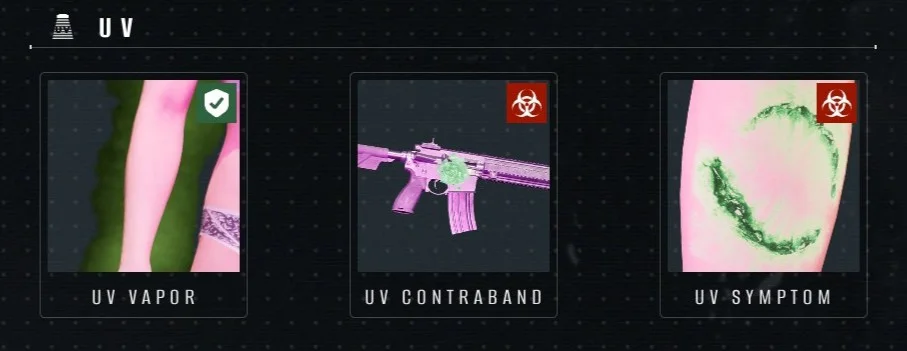
UV Vapor
Visual Cue
Green mist surrounding part of the survivor
Action
Allow into Living Block
A visible green mist surrounds some part of the survivor's body while UV is active. This indicates a non-threatening condition. Note: Survivors with this symptom often have a fly buzzing sound effect.
UV Contraband
Visual Cue
Green glowing spot on items from backpack
Action
Liquidate Immediately
An item from the survivor's backpack glows green under UV light, indicating it has been contaminated with infected material. The survivor must be eliminated.
UV Symptom (Hidden)
Visual Cue
Normally invisible symptom glows green during UV
Action
Liquidate Immediately
Some red appearance symptoms (like bite marks, necrosis, or eye/mouth leakage) are invisible under normal light but glow green under UV. If you see a glowing spot on the survivor's body, they are infected.
Symptoms Detected by UV Tower
| Symptom | Visual Cue | Danger Level | Action |
|---|---|---|---|
| UV Vapor | Green mist surrounding part of the survivor | Green - Safe | Allow into Living Block |
| UV Contraband | Green glowing spot on items from backpack | Red - Infected | Liquidate Immediately |
| UV Symptom (Hidden) | Normally invisible symptom glows green during UV | Red - Infected | Liquidate Immediately |
Pro Tips
Common Mistakes to Avoid
Confiscating items before UV check
✓ Always check backpack items with UV light FIRST - contaminated items glow green
Missing hidden symptoms on the body
✓ Scan the survivor's entire body during UV - hidden symptoms can appear anywhere
Forgetting UV Tower exists
✓ The UV Tower catches symptoms that NO other tool can detect - always use it
Not waiting for recharge
✓ If you're unsure, wait for recharge and scan again - it's worth the extra check
Ignoring the fly buzzing sound
✓ A buzzing fly sound often correlates with UV symptoms - use it as an audio cue